Telecentre Entrepreneur Course (TEC)

Telecentre Entrepreneur Course (TEC)

TEC


Telecentre Entrepreneur Course (TEC) Certificate program is Designed by CSC Academy for giving knowledge about CSC Centre working Culture, and to Introduce Basic information of various parts of CSC, So that New CSC VLE can get all the information "He" or "She" need while taking further steps for being a Village Level Entrepreneur. It is all about Entrepreneurial Skills which is needed for being a part of CSC. It gives opportunities to any Citizen of India who complete the norms of Eligibility for opening CSC Center. 

To Register yourself for this Program Visit Below Link of Website

TEC

Modules Under TEC Program

1. CSC Darpan Products and Services

2. Entrepreneurship

3. Entrepreneurship and Entrepreneurial Character

4. Identifying Business Opportunities

5. Understanding Cost Structures

6. Long term Orientation

7. Recording Business Transactions

8. Basic Financial Terms

9. Accounting and Business Reporting

10. Marketing Education handling Questions Concerns

11. Marketing Education Value


Each Module Contains Basic Details related to CSC activity as per Topic Mentioned above. Keep studying Modules and Follow the Proper guidelines mentioned in the modules. Make notes so that it will help you in getting right answer. After Completion of Each Module User will get Questionnaire Section. If your are well prepared you will get answer easily.

Complete the Modules one by one. You can Download or Print these modules for your future reference also. 

After Completion of your all Modules you will get certificate of TEC Program. Which can used while CSC Registration Process of Individual User.  

Note : Modules can Be changed in certain time periods, because currently its having 11 Modules with Different topics, earlier it contains 10 Assessment Modules.

How to Apply for CSC Center - เคฒोเค• เคธेเคตा เค•ेंเคฆ्เคฐ เค•ैเคธे เคถुเคฐु เค•เคฐें ?

How to Apply for CSC Center

เคฒोเค• เคธेเคตा เค•ेंเคฆ्เคฐ เค•ैเคธे เคถुเคฐु เค•เคฐें ?


How to Apply for CSC

CSC Center or Common Service Center is very old and vast topic, but Still people are not aware about it in proper manner. There are so many Information about CSC Services but Process by Process Details are Explained by few of the Authors and Helpdesks, that's why I re-introduced this topic in my blog. Hope reader will understand the steps easily to Apply for CSC Center. I will tell all the genuine things which will help you in doing setup your Center.

Common things to Know Before Applying for CSC Center

1. Basic Knowledge of operating Computer or Laptop : 

For being a CSC Operator it is necessary to have basic knowledge of Computer and used to in operating websites and Mobile Applications. Access of Computer Device is necessary because all the future works will be done through your computer device and some time with Smartphone.

Currently Windows 11 Operating System with Google Chrome or Mozilla Firefox Browser, you can get able to operate your CSC Services Properly. 

2. Location of Work : 

Before applying for CSC Center, properly check and choose your location of work, it can be Rural area - Like Villages, Little Town - Like Nagar Panchayat , Urban and Remote areas where Internet facilities will be rare and in low range. It is always matters to get best place for your work. Regular Traffic to your center make you earn regularly. 

3. Arrangements of Computer Peripheral Devices : 

Get ready to arrange all the Peripheral devices after getting your Registration Process Done for Common Service Center. We Will also Provide Details about all the devices which are required after registration process completed. Basically Printer, Biometric Device, Micro ATM and Irish Device etc. are required for start functioning your CSC Center.

4. Language :

To understand all the process, it is mandatory to know some basic languages by the operator - Like Hindi, English and in some areas Regional Languages to Communicate with local people and for Read and Understand Work Instructions Provided by CSC Portal or through District Manager of your Area of work.

5. Work Space : 

Generally a 10 x 12 feet room is sufficient to utilize it as Work Space. If you think traffic chances are more than you can go for big space also. Your room will be filled with Tables, Printing Space, Chairs and other necessary accessories. It is all depend on you, how you utilize your space for better work performance.

6. Sitting Habit while Working : 

You have to make habit of Sitting in front of Computer for continues work, because when some Government Related work is assigned, all the time operator manage to do work continuously. Like - Ayushman Card work, Aadhaar Card Work, AEPS Work, Data Entry Work, PM Shram Yogi Maan-dhan (PM-SYM) Yojana, E-shram Card Work and other government related schemes etc. 

 7. Communication Skills and Behavior:

Communication Skill will help you in your working habit, making customer more comfortable and understandable the process of work. Don't get angry while Time Taken Work and also tell the customer process take some time to proceed. Some time you will face Technical Issues Like - Server Down, Link not working, Mobile Recharge Process Error but Amount Deducted from Wallet. In this time your communication skill and behavior will help you in managing current situation. Be Calm and work Harder to get Succeed.

8. CSC VLE (Village Level Entrepreneur) :

CSC Operator is not known as computer operator, but he or she will be known as CSC VLE (Village Level Entrepreneur). An identical Name with Certification from CSC Authorities and Place of Work Details.


Now after general important minor Topics we are going to start the Process of "How to Apply for CSC Center" 

Apply For TEC and Bank BC Exam  

Before Doing process of CSC Registration, Telecentre Entrepreneur Course (TEC) and Business Correspondents / Facilitators (BC) exam Certification program are required for all new registrations. You have to pass these both Certificate programs before applying for CSC Center. Examination Fees will be applicable in both Examination. 


At earlier stage of CSC Registration Process, these certification programs are not included, but after few years these certifications are become necessary for all the existing CSC VLEs. We  also Passed TEC Certificate programs, and Business Correspondents (BC) program for doing Banking related works under CSC Centers.

 
For Getting Information about Telecentre Entrepreneur Course Visit Our another post with Complete details about it by clicking link Below.

 
TEC


For Business Correspondents (BC) You have to Register yourself in IIBF - Indian Institute of Banking and Finance program. This portal provides various types of Certified Course related to Banking and Finance. For each and every purpose there is a course divided as per requirement, because all course are target oriented which help you in growing in your field of work. 


Go to Below Link for more details about Business Correspondents Training Program

Self Document Verification and Correction

Now a days there are so many documents we have, like - Marksheet, Voter ID, Aadhaar ID, Passport, PAN Card, Bank Passbook, etc. Please Do check Spelling of Your Name, Date of Birth, Fathers Name, Mothers Name, Address, Mobile number etc. in all your documents. If the details are mis-matching in your documents - Do Correction before Registration. Because it Fetch data as per detail given in documents, if your details are not correct your details will be uploaded incorrectly or the process will not get proceed.  

Police Verification

Visit to your nearest Police Station, which comes under your territory area and Ask theme for Character Certificate, They will Verify your Details from your location local authorities and provide certificates in few days as per procedure. All old CSC VLE's are also faced this process. This certificate is get uploaded in CSC Account Section. This Certificate will be required at the time of Registration Process.

CSC Registration Process and Documents

After Completion of all mandatory Certificate Process and self document Verification and Correction, now we can start Registration Process. Earlier their was a single portal for all type of CSC Registration process. But now for Registering under Specific Schemes Like - SHG, FPO, Banking, Private Banking, CSC Employee etc. the following Website is used https://register.csc.gov.in and for Individual CSC VLE https://cscregister.csccloud.in/ . 

In this post we will fully focus on Individual CSC Center Registration Process Because Specific Scheme based registration required different documents then the Individual Applicant.

Keep Documents Ready for Registration

1. PAN Card
2. Aadhaar Card - Front and Back Side
3. Voter ID Card - Front and Back Side
4. Passport
5. Passport Photo
6. Police Verification Document
7. Telecentre Entrepreneur Course (TEC) Certificate
8. Business Correspondents (BC) Certificate
9. Highest Qualification Document
10. Bank Passbook Details
11. Email ID and Mobile Number

Keep all the Scanned Documents in JPG, PNG or PDF Format, and size of each scanned document will be less then 1 MB.

After arranging these documents and details go for link mentioned above for Individual Registration. Then follow the below Steps to Proceed.

1. CSC Application Type

Here Personal Details and KIOSK Details are Required. Enter Details about TEC Number and BC Certificate Number. Validation Process will start working. Name and other Basic Details about Applicant will available here.

2. Authentication Details

Email ID and PAN Details - Verification of your Email ID, Mobile number and PAN card will help you in getting future corresponding Mail from CSC

3. Banking Details

Provide your Bank Details - This Bank Account will be authorized to make transactions in your Digital Seva Portal.

4. Documents

Upload your all necessary Scanned Documents as per mentioned Space for particular defined Document.

5. Preview

In this section you will able to Check your all Submitted details in the Registration process before final submission.

6. Download CSC App

By using your smart phone visit to google play store and search for CSC App. This app will help you in Geotagging your location of work.

After completing all these process you will get a Application Reference number and other important details in your Email ID on Successful Registration process within 48 hours. To check status click link below. You will get redirected to Status Checking Page.
 

Do Follow these steps to get easily Register yourself. All the best to all new CSC VLE's. Hope you get general guidance by this post.


Note : Do Comments to have any queries related to it, I will try my Best to resolve your issues.

Aadhaar Service Charges 2026

Aadhaar Service Charges

The Rates for Various Aadhaar Work are predefined and are mentioned below in this post. Rates are set by the Government body from time to time so that Aadhaar Centers receive a genuine fee for providing this service to the customers or new Enroller.


Aadhaar Service Charges 2026

5 Important Charges or Fees for Aadhaar Services

1. Aadhaar Enrollment: - For new Aadhaar enrollment, there are no charges applied. In this category, those applicants are coming whose Aadhaar card does not yet exist. For example, newborn children. In new enrollment of newborn children, guardian details are also required, so kindly take the Aadhaar card of the guardian at the time of the enrollment process. Guardian's name will be mentioned on the front side of the Aadhaar card also.  

2. Mandatory Biometric Update: - There are no charges applied when a child between the age groups of 5 - 7 and 15 - 17 goes for Mandatory Biometric Upgradation in the Aadhaar Center. While making the upgradation guardian's name will be removed from the Aadhaar card's front side portion. The photo was also upgraded during this procedure because, with increasing age, the face also changes. Also, IRIS data with the help of the IRIS scanning device, which is used for scanning Eyes are updated. 
 
3. Other Biometric Update: - Other than a newborn child or first-time Aadhaar Enrollment, Rs. 125 will be charged to those who want to upgrade their Photo, Fingerprints, and IRIS Data in Aadhaar. It is necessary to process for all enrolled people whose fingerprints and IRIS data are not clear in the Aadhaar Database and are getting errors when making Banking transactions through biometric devices like Morpho, Mantra, Startek, etc.

4. Demographic Update: - Rs. 75 will be charged for correcting the name and Surname, Date of Birth, Gender, Current Address, Mobile Number, or Email ID on the Aadhaar Card. Many people do not update their mobile numbers when they lose them, or numbers are not in service, and face problems while downloading their Aadhaar Card from the UIDAI Aadhaar portal.

Note: All the details were not changed at the same time, so consult the Aadhaar Center before the application process if having more than one issue.   

5. Aadhaar Search and Color Print: - Aadhaar Search and Download and Print Service is not working in the CSC Portal. 

The reader can download the rate list from the official UIDAI Portal by clicking the ''Download" Button from here in PDF format. Aadhaar centers can use this notice for charging genuine amounts from their customers.


AADHAAR RATE CHART TEMPLATE


If you like this template, you can download the Aadhaar Rate Chart PDF by clicking the ''Download'' button.


 Note: Aadhaar Service Charges may vary according to Decisions taken by the Aadhaar Administration Team. Kindly Visit Official Website Link for More Details.


Our Other Important Post Links Below:


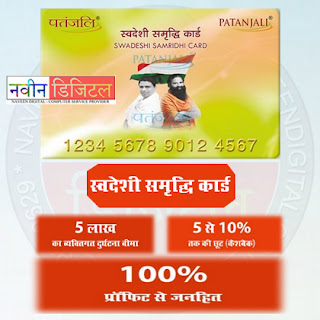
เคชเคคंเคœเคฒि เคธ्เคตเคฆेเคถी เคธเคฎृเคฆ्เคงि เค•ाเคฐ्เคก | Patanjali Swadeshi Samridhi Card

เคชเคคंเคœเคฒि เคธ्เคตเคฆेเคถी เคธเคฎृเคฆ्เคงि เค•ाเคฐ्เคก | Patanjali Swadeshi Samridhi Card


เคจเคฎเคธ्เค•ाเคฐ เคฎिเคค्เคฐों เค†เคœ เคนเคฎ เคฌाเคค เค•เคฐเคจे เคœा เคฐเคนे เคนैं เคธी.เคเคธ.เคธी. เค•ी เคจเคฏी เคธเคฐ्เคตिเคธ เค•े เคฌाเคฐे เคฎें , เคœो เค•ि เคธ्เคตเคฆेเคถी เค‰เคค्เคชाเคฆों เค•े เค•्เคฐเคฏ เคตिเค•्เคฐเคฏ เค•ो เคฐाเคท्เคŸ्เคฐीเคฏ เคต เค…เคจ्เคคเคฐाเคท्เคŸ्เคฐीเคฏ เคธ्เคคเคฐ เคชเคฐ เคฌเฅाเคตा เคฆेเค—ी ।เค†เคœ เค‡เคธ เคธेเคตा เค•ी เคœाเคจเค•ाเคฐी เคซेเคธเคฌुเค• เคฒाเค‡เคต เค•े เคฎाเคง्เคฏเคฎ เคธे เคธเคญी เคธी.เคเคธ.เคธी. เคตी.เคเคฒ.เคˆ (CSC VLE) เค•ो เคฆी เคœा เคฐเคนी เคนै।


เคนเคฎ เคฌाเคค เค•เคฐ เคฐเคนे เคนैं - เคชเคคंเคœเคฒि เคฆ्เคตाเคฐा เคฌเคจाเคฏे เคœा เคฐเคนे "เคชเคคंเคœเคฒि เคธ्เคตเคฆेเคถी เคธเคฎृเคฆ्เคงि เค•ाเคฐ्เคก" เค•े เคตिเคทเคฏ เคฎें । เคชเคคंเคœเคฒि เค•े เคฎैเคจेเคœिंเค— เคกाเคฏเคฐेเค•्เคŸเคฐ เคเคตं เค•ो-เคซाเค‰ंเคกเคฐ "เค†เคšाเคฐ्เคฏ เคถ्เคฐी เคฌाเคฒเค•ृเคท्เคฃ เคœी" เคฆ्เคตाเคฐा เค†เคœ เคธเคญी เคธी.เคเคธ.เคธी. เคตी.เคเคฒ.เคˆ. เค•ो เคธंเคฌोเคงिเคค เค•เคฐเคคे เคนुเค เคธ्เคตเคฆेเคถी เคธเคฎृเคฆ्เคงि เค•ाเคฐ्เคก เค•ी เคœाเคจเค•ाเคฐी เคช्เคฐเคฆाเคจ เค•ी เค—เคˆ । เค‰เคจเค•े เคฆ्เคตाเคฐा เคฆी เค—เคˆ เคœाเคจเค•ाเคฐी เค…เคจुเคธाเคฐ เคฏเคน เคธเคญी เคฒोเค• เคธेเคตा เค•ेเคจ्เคฆ्เคฐ เคธंเคšाเคฒเค•ों เค•े เคฒिเค เคธुเคจเคนเคฐा เค…เคตเคธเคฐ เคช्เคฐเคฆाเคจ เค•เคฐेเค—ी, เคธाเคฅ เคนी เคธाเคฅ เค‡เคธเคธे เค‰เคชเคฏोเค—เค•เคฐ्เคคाเค“ं เค•ो เคญी เคธเคฎเคฏ เคธเคฎเคฏ เคชเคฐ เค–เคฐीเคฆी เค•เคฐเคจे เคชเคฐ เค•ैเคถเคฌैเค• เคœैเคธे เค‘เคซเคฐ เค•ा เคฒाเคญ เคช्เคฐเคฆाเคจ เค•เคฐेเค—ी।

  เค•ाเคฐ्เคก เค•ा เค‰เคชเคฏोเค— เค•เคนाँ เคนोเค—ा ?

เค‡เคธ เค•ाเคฐ्เคก เค•ा เค‰เคชเคฏोเค— เคชเคคंเคœเคฒि เค•े เคธ्เคŸोเคฐ्เคธ เคเคตं เคšिเค•िเคค्เคธाเคฒเคฏों เคฎें เค•िเคฏा เคœा เคธเค•ेเค—ा । เค‡เคธ เค•ाเคฐ्เคก เค•ो เค†เคช เคชเคคंเคœเคฒि เค‰เคค्เคชाเคฆ เค–เคฐीเคฆเคจे เค•े เคฒिเค เคŸॉเคช-เค…เคช เค•เคฐा เคธเค•เคคे เคนैं เคœिเคธเค•े เคเคตเคœ เคฎें เค†เคชเค•ो 10 เคช्เคฐเคคिเคถเคค เคคเค• เค•ा เค…เคคिเคฐिเค•्เคค เคฒाเคญ เคช्เคฐाเคช्เคค เคนोเค—ा ।

 เค‡เคธเค•े เค…เคจ्เคฏ เคฒाเคญ เค•เคฏा เคนैं ?

เค‡เคธ เค•ाเคฐ्เคก เค•ी เคเค• เค…เคจ्เคฏ เคฎเคนเคค्เคตเคชूเคฐ्เคฃ เคธुเคตिเคงा เคนै - เคœो ,เคนै 5 เคฒाเค– เคคเค• เค•ा เคต्เคฏเค•्เคคिเค—เคค เคฆुเคฐ्เค˜เคŸเคจा เคฌीเคฎा । เคชเคคंเคœเคฒि เค•ी เค“เคฐ เคธे เคฏเคน เคเค• เคจเคฏा เคช्เคฐเคฏाเคธ เคตाเค•เคˆ เคฎें เคฒोเค—ों เค•े เคฒिเค เค‰เคชเคฏोเค—ी เคนो เคธเค•เคคा เคนै। เคœिเคธ เคช्เคฐเค•ाเคฐ เคธे เค†เคฏुเคท्เคฎाเคจ เคญाเคฐเคค เค•ाเคฐ्เคก เค•े เคฎाเคง्เคฏเคฎ เคธे เคธเคญी เคฐाเคถเคจเค•ाเคฐ्เคกเคงाเคฐी เคชเคฐिเคตाเคฐों เค•ो 50,000 เคธे 5,00,000 เคฐुเคชเคฏे เคคเค• เค•ी เคšिเค•िเคค्เคธीเคฏ เคธुเคตिเคงा เคธเคฐเค•ाเคฐ เคฆ्เคตाเคฐा เคฆी เคœा เคฐเคนी เคนै।

|| เค†เคฏुเคท्เคฎाเคจ เคญाเคฐเคค เค•ाเคฐ्เคก เค†เคตेเคฆเคจ เค•ी เค…ंเคคिเคฎ เคคिเคฅि  31 เค…เค•्เคŸूเคฌเคฐ 2021 เคนै, เค…เคชเคจे เคจเคœเคฆीเค•ी เคฒोเค• เคธेเคตा เค•ेเคจ्เคฆ्เคฐों เคฎें เคธंเคชเคฐ्เค• เค•เคฐें , เคธाเคฅ เคนी เคธाเคฅ เคฐाเคถเคจ เค•ाเคฐ्เคก, เค†เคงाเคฐ เค•ाเคฐ्เคก เคเคตं เคฎोเคฌाเค‡เคฒ เคจंเคฌเคฐ เค…เคตเคถ्เคฏ เคฒे เคœाเคฏें ||

 เคธ्เคตเคฆेเคถी เคธเคฎृเคฆ्เคงि เค•ाเคฐ्เคก เคนेเคคु เค†เคตेเคฆเคจ เค•เคนाँ เค•เคฐें ?

เคธเคฐ्เคตเคช्เคฐเคฅเคฎ เคฏเคน เค…เคตเคถ्เคฏ เคœ्เคžाเคค เคฐเค–ें, เคฏเคน เค•ाเคฐ्เคก เค•िเคธी เคธเคฐเค•ाเคฐी เคฏोเคœเคจा เค•े เค…ंเคคเคฐ्เค—เคค เคจเคนीं เคฌเคจाเคฏा เคœा เคฐเคนा เคนै । เคฏเคน เค•ाเคฐ्เคก เคชเคคंเคœเคฒि เคฆ्เคตाเคฐा เค…เคชเคจे เค‰เคชเคญोเค•्เคคाเค“ं เค•ो เค…เคคिเคฐिเค•्เคค เคธुเคตिเคงा เคช्เคฐเคฆाเคจ เค•เคฐเคจे เคนेเคคु เคฌเคจाเคฏा เคœा เคฐเคนा เคนै, เคœिเคธเคธे เค•ी เค‰เคชเคญोเค•्เคคा เคœो เคชเคคंเคœเคฒि เค•े เค‰เคค्เคชाเคฆเคจ เค•ा เค‰เคชเคฏोเค— เค•เคฐเคคे เคนैं เค‰เคจเค•ो เค–เคฐीเคฆी เค•ी เคธुเคตिเคงा เคนเคฐ เคœเค—เคน เค†เคธाเคจी เคธे เคฎोเคนैเคฏा เค•เคฐाเคˆ เคœा เคธเค•े । 

เคฏเคน เค•ाเคฐ्เคก เคฒोเค• เคธेเคตा เค•ेเคจ्เคฆ्เคฐों เค•े เคฎाเคง्เคฏเคฎ เคธे เคฌเคจाเคฏा เคœाเคเค—ा । เคœिเคจเค•ो เค‡เคธ เค•ाเคฐ्เคก เค•ी เค†เคตเคถ्เคฏเค•เคคा เคนै เคตो เคต्เคฏเค•्เคคिเค—เคค เคฐूเคช เคธे เคเค• เคจिเคถ्เคšिเคค เคฐाเคถि เค•ा เคญुเค—เคคाเคจ เค•เคฐเค•े เค‡เคธเค•ाเคฐ्เคก เค•ो เคฌเคจเคตा เคธเค•เคคे เคนैं ।

 เคจिเคšे เคฆिเค เค—เค เคฒिंเค• เคชเคฐ เคœाเค•เคฐ เค†เคช เค‡เคธเคธे เคธเคฎ्เคฌंเคงिเคค เค…เคงिเค• เคœाเคจเค•ाเคฐी เคช्เคฐाเคช्เคค เค•เคฐ เคธเค•เคคे เคนैं | 


 เคนเคฎाเคฐे เค…เคจ्เคฏ เคฎเคนเคค्เคตเคชूเคฐ्เคฃ เคฒेเค– เค…เคตเคถ्เคฏ เคชเฅें :-

1 . เคชेเคจ เค•ाเคฐ्เคก เคธे เค†เคงाเคฐ เค•ाเคฐ्เคก เคฒिंเค• เค•ैเคธे เค•เคฐें?

2 . What is EShram Card in Hindi | เคˆ-เคถ्เคฐเคฎ เค•ाเคฐ्เคก เค•เคฏा เคนै 

3 . เคธเคฐ्เคตे เคช्เคฐोเค—्เคฐाเคฎ เคœ्เคตाเค‡เคจ เค•เคฐเค•े เคชैเคธे เค•เคฎाเคं 

How to Use DIGIPAY: Digipay is Software to use AEPS Service

How to use DIGIPAY

How to use DIGIPAY


Hello Friends, Today We are going to Learn about How to use DIGIPAY. What are the Key Functions of DIGIPAY, Benefits of DIGIPAY in Day-to-Day Life. From Where we can Download this Software and Android App, who are Eligible to Operate this Software and App. We Will try to Cover all the Details Regarding this Software. 

1. ABOUT DIGIPAY

DIGIPAY is a Secured Digital Transaction System, introduced for banking transactions facility operated by Common Service Center (CSC) VLE's (Village Level Entrepreneur) in allover India. CSC centers are allowed to provide banking related service to their users. It is based on Aadhaar Authentication System as well as easily operative system and best for new digital transaction process.

Government steps for starting this service is very appreciable because its covers each and every remote area basically rural area, where banking service does not reach easily. 

2. What are the Key Functions of DIGIPAY?

Cash deposit, Cash Withdrawal, Balance Enquiry, Bill Payments is the key functions of DIGIPAY AePS Service (Aadhaar Enabled Payment System). All the transactions are highly secured and managed by National Payment Corporation of India (NPCI) and IndusInd Bank. 

3. Benefits of DIGIPAY

a) Linked Bank - Mostly all banks are listed under this service available in India.

b) Easy to Operate - VLE can operate this service in Laptop Computers and Android phones both.

c) It covers most of the remote rural area were banking service not available properly.

d) Service can be used "anytime anywhere" - if the VLE is not available in-service area he or she can operate it in any places and help users in making banking operations.

e) Safe transaction - this service is operated with the help of government agency collaboration with IndusInd Bank, and time-to-time upgradation makes it safer.

4. How to Withdrawal Money from DIGIPAY?

Digipay
DIGIPAY

Users have to provide the following details mentioned below to the CSC VLE at the time of transaction. Without available of account holder no one can withdrawal their amount, or deposit amount to their bank account.

Detail Required while procedure: - 

a. BANK NAME: - Provide Bank name to VLE (Village Level Entrepreneur), he/she will select your bank from provided bank list in DIGIPAY Software and Android app.

b. Amount: - Tell the Amount you want to withdrawal from your account. Minimum Withdrawal limit is Rs. 100.

c. Customer Aadhaar Number: - Give detail about 12 Digit Aadhaar number of Self who want to make transaction from their account.

d. Mobile Number: - Also Provide your Mobile Number to get notification while making transaction / or after transaction.

e. Check Box: - VLE will tick mark the Agreement details which says, "I agree to Provide Aadhaar Authentication to continue with this transaction''. It means user giving consent to the procedure of transaction so that in future user not able to claim that transaction not done by them. 

f. Finger Scan: - After Completing all these information, VLE will Scan your Finger with the help of Fingerprint Scanner. After few seconds of process, the transaction will get completed.

* Note - The Process of Transaction will be successful in various conditions only: - 

Bank Account and Aadhaar are Linked: - If your Aadhaar number is not yet linked with your Bank account in that case, you will not be able to withdrawal cash from DIGIPAY or make any kind of transaction. If Aadhaar is already linked, then you can use this service. Aadhaar KYC in Bank is mandatory. 

5. who are Eligible to Operate this Software and App?

All Choice Centers, CSC Centers are only Eligible to operate this service by registering themselves through CSC ID, Mobile number, Email ID and Banking details.

6. How to download DIGIPAY Software and App?

CSC VLE's can download DIGIPAY software and app by clicking below link ''download" from DIGIPAY official website. Do not try to download this software from unofficial website.


To run DIGIPAY in your computer and Android phone, RD Service is must for your devices. About this service we will explain in our next post. 

Hope you enjoyed our information, kindly make comments on this post and tell us about your opinion and queries regarding it. We will try our best to resolve your issues.

THANK YOU


Our Other Important Articles: - 
 

What is EShram Card in Hindi | เคˆ-เคถ्เคฐเคฎ เค•ाเคฐ्เคก เค•เคฏा เคนै


E-Shram Card

เคˆ-เคถ्เคฐเคฎ เค•ाเคฐ्เคก เค•เคฏा เคนै?

What is EShram Card in Hindi เคˆ-เคถ्เคฐเคฎ เค•ाเคฐ्เคก, เคถ्เคฐเคฎ เคเคตं เคฐोเคœเค—ाเคฐ เคฎंเคค्เคฐाเคฒเคฏ เคฆ्เคตाเคฐा เคฌเคจाเคฏा เคœा เคฐเคนा เคนै। เคˆ-เคถ्เคฐเคฎ เค•ाเคฐ्เคก เคญाเคฐเคค เค•े เคธเคญी เคฐाเคœ्เคฏों เค•े เคธเคฎเคธ्เคค เค…เคธंเค—เค िเคค เค•ाเคฎเค—ाเคฐों เคเคตं เคถ्เคฐเคฎिเค•ों เค•ा เคตिเคธ्เคคृเคค เคฒेเค–ा เคœोเค–ा เคนै। เค‡เคธเค•े เค…ंเคคเคฐ्เค—เคค เคต्เคฏเค•्เคคि เคตिเคถेเคท เค•ा เค•ाเคฐ्เคฏ เค•ा เคช्เคฐเค•ाเคฐ, เค•ाเคฐ्เคฏ เค…เคจुเคญเคต, เค†เคฎเคฆเคจी, เคตเคฐ्เคคเคฎाเคจ เคเคตं เคธ्เคฅाเคฏी เคชเคคा, เค†เคฆि เคœाเคจเค•ाเคฐी เคเค•เคค्เคฐिเคค เค•ी เคœा เคฐเคนी เคนै, เคœिเคธเคธे เค•ी เคธเคฐเค•ाเคฐ เค•ो เคธ्เคชเคท्เคŸ เคœाเคจเค•ाเคฐी เคช्เคฐाเคช्เคค เคนो เคธเค•े เค•ी เคญाเคฐเคค เค•े เคจाเค—เคฐिเค• เค•िเคธ เคคเคฐเคน เค…เคชเคจा เคœीเคตเคจ-เคฏाเคชเคจ เค•เคฐ เคฐเคนे เคนैं เค”เคฐ เค‰เคจเค•ो เค†เคจे เคตाเคฒे เคธเคฎเคฏ เคฎें เค…เคงिเค• เคธे เค…เคงिเค• เคธเคฐเค•ाเคฐी เคฏोเคœเคจाเค“ं เค•ा เคฒाเคญ เคฎिเคฒ เคธเค•े।  

เคˆ-เคถ्เคฐเคฎ เค•ाเคฐ्เคก เคฐाเคท्เคŸ्เคฐीเคฏ เคธ्เคคเคฐ เคชเคฐ เคคैเคฏाเคฐ เค•िเคฏा เคœा เคฐเคนा เคนै, เคœिเคธเค•ा เคฒाเคญ เค†เคจे เคตाเคฒे เคธเคฎเคฏ เคฎें เค…เคตเคถ्เคฏ เคนी เคธเคญी เค…เคธंเค—เค िเคค เค•ाเคฎเค—ाเคฐों เค•ो เคฎिเคฒेเค—ा । เคˆ-เคถ्เคฐเคฎ เค•ाเคฐ्เคก เคฎें เคฆเคฐ्เคœ เคœाเคจเค•ाเคฐिเคฏाँ เคชूเคฐ्เคฃเคฐूเคช เคธे เค—ुเคช्เคค เคเคตं เคธुเคฐเค•्เคทिเคค เคฐเค–ी เคœा เคฐเคนी เคนै।

เคˆ-เคถ्เคฐเคฎ เค•ाเคฐ्เคก เค•े เค•เคฏा - เค•เคฏा เคตिเคถेเคทเคคाเคं เค…เคฅเคตा เคฒाเคญ เคนैं?

* เคˆ-เคถ्เคฐเคฎ เค•ाเคฐ्เคก เคฆ्เคตाเคฐा เคธเคญी เค•ाเคฎเค—ाเคฐों เค•ो เค†เคงाเคฐ เคจंเคฌเคฐ เค•ी เคญांเคคि เคเค• เคฏूเคจिเค• เคจंเคฌเคฐ เคช्เคฐเคฆाเคจ เค•िเคฏा เคœा เคฐเคนा เคนै, เคœिเคธे UAN เคจंเคฌเคฐ (Universal Account Number) เค•เคนा เคœाเคคा เคนै । เค‡เคธ เคจंเคฌเคฐ เค•े เค†เคงाเคฐ เคชเคฐ เคนी เค†เคจे เคตाเคฒे เคธเคฎเคฏ เคฎें เค•ाเคฎเค—ाเคฐों เค•ो เคฎोเคจिเคŸเคฐ เค•िเคฏा เคœा เคธเค•เคคा เคนै।

* เคˆ-เคถ्เคฐเคฎ เค•ाเคฐ्เคก เคฎें เคฆเคฐ्เคœ เค•ाเคฐ्เคฏों เค•े เคตिเคตเคฐเคฃ เคต เค•ाเคฎเค—ाเคฐ เค•े เค…เคจुเคญเคต เค•े เค†เคงाเคฐ เคชเคฐ เคฐोเคœเค—ाเคฐ เคช्เคฐเคฆाเคจ เค•เคฐเคจे เคตाเคฒी เคธंเคธ्เคฅाเคं เคญी เค•ाเคฐ्เคฏ เค•े เคจเค เค…เคตเคธเคฐ เคช्เคฐเคฆाเคจ เค•เคฐेเค—ी।

* เคธเคญी เคˆ-เคถ्เคฐเคฎ เค•ाเคฐ्เคกเคงाเคฐिเคฏों เค•ो เคฌीเคฎा เคญी เคธाเคฅ เคฎें เคฆिเคฏा เคœा เคฐเคนा เคนै, เคœो เค‡เคธ เคฏोเคœเคจा เค…ंเคคเคฐ्เค—เคค เคธเคฎ्เคฎिเคฒिเคค เคนै। เค•िเคธी เคช्เคฐเค•ाเคฐ เค•ी เค…เคช्เคฐिเคฏ เค˜เคŸเคจा เคนोเคจे เคชเคฐ เคจॉเคฎिเคจी เค•ो เคฌीเคฎा เค•े เค†เคงाเคฐ เคชเคฐ เคญुเค—เคคाเคจ เค•िเคฏा เคœाเคเค—ा।

เคˆ-เคถ्เคฐเคฎ เค•ाเคฐ्เคก เค•ा เค†เคตेเคฆเคจ เค•ैเคธे เค•เคฐें?

เคธเคฐ्เคตเคช्เคฐเคฅเคฎ เค†เคตेเคฆเค• เค•ो เคถ्เคฐเคฎ เคเคตं เคฐोเคœเค—ाเคฐ เคฎंเคค्เคฐाเคฒเคฏ เคฆ्เคตाเคฐा เคœाเคฐी เค•ी เค—เคฏी เคตेเคฌเคธाเค‡เคŸ เคฎें เคœाเคจा เคชเฅœेเค—ा, เคœिเคธเค•ा เคฒिंเค• เคจिเคšे เคธाเคा เค•िเคฏा เค—เคฏा เคนै।  เค‡เคธ เคฒिंเค• เค•े เคฎाเคง्เคฏเคฎ เคธे เค†เคตेเคฆเค• เค…เคชเคจा เคธ्เคตเคฏं เค•ा เคˆ-เคถ्เคฐเคฎ เค•ाเคฐ्เคก เคฌเคจा เคธเค•เคคे เคนैं เค…เคฅเคตा เคฒोเค• เคธेเคตा เค•ेเคจ्เคฆ्เคฐ เค•े เคฎाเคง्เคฏเคฎ เคธे เคญी เค…เคชเคจा เค†เคตेเคฆเคจ เคฆเคฐ्เคœ เค•เคฐा เคธเค•เคคे เคนैं।

https://register.eshram.gov.in/#/user/self

เค‡เคธ เคฒिंเค• เคฎें เคœाเคจे เคชเคฐ เค†เคชเค•ो เคฏเคน เคชेเคœ เคจเคœเคฐ เค†เคเค—ा

ScreenShot

Figure 1 - เคˆ-เคถ्เคฐเคฎ เค•ाเคฐ्เคก เคตेเคฌเคธाเค‡เคŸ เคช्เคฐเคฅเคฎ เคชेเคœ


เคˆ-เคถ्เคฐเคฎ เค•ाเคฐ्เคก เค•े เคฒिเค เค†เคตเคถ्เคฏเค• เคฆเคธ्เคคाเคตेเคœ เคเคตं เคœाเคจเค•ाเคฐी เค•เคฏा - เค•เคฏा เคนैं?

เคฌเคคाเคฏे เคœा เคฐเคนे เคธเคญी เค†เคตเคถ्เคฏเค• เคฆเคธ्เคคाเคตेเคœ เค…เคชเคจे เคธाเคฅ เค†เคตेเคฆเคจ เค•े เคธเคฎเคฏ เค…เคตเคถ्เคฏ เคฒे เคœाเคฏें, เค…เคจ्เคฏเคฅा เค†เคช เคฐเคœिเคธ्เคŸ्เคฐेเคถเคจ เค•ी เคช्เคฐเค•्เคฐिเคฏा เค•ो เคชूเคฐ्เคฃ เคจเคนीं เค•เคฐ เคชाเคฏेंเค—े।

i) เคธ्เคตเคฏं เค•ा เค†เคงाเคฐ เค•ाเคฐ्เคก (Aadhaar Card)

ii) เคจॉเคฎिเคจी (Nominee) เค•ा เค†เคงाเคฐ เค•ाเคฐ्เคก – เคง्เคฏाเคจ เคฐเค–ें เคจॉเคฎिเคจी เค•ा เค†เคฏु 13 เคตเคฐ्เคท เคธे เค…เคงिเค• เคนोเคจा เคšाเคนिเค เค…เคจ्เคฏเคฅा เคธाเคฅ เคฎें เค…เคญिเคญाเคตเค• เค•ा เคจाเคฎ เคญी เคฆเคฐ्เคœ เค•เคฐเคจा เคชเฅœेเค—ा เคเคตं เค‰เคจเค•ा เคญी เค†เคงाเคฐ เค•ाเคฐ्เคก เคฒเค—ेเค—ा। เคจॉเคฎिเคจी เคฎें เค•ेเคตเคฒ เค†เคตेเคฆเค• เค•े เค•เคฐीเคฌी เคชเคฐिเคšिเคค เคฒोเค—ों เค•ा เคนी เคจाเคฎ เคฆเคฐ्เคœ เค•िเคฏा เคœा เคธเค•เคคा เคนै।

เคœैเคธे – เค‰เคฆाเคนเคฐเคฃ เค•े เคฒिเค, เค†เคตेเคฆเค• เคฎเคนिเคฒा เคนोเคจे เคชเคฐ – เคชเคคि, เคชुเคค्เคฐ, เคชुเคค्เคฐी, เคฌเคนเคจ เค†เคฆि เค•ो เคนी เคจॉเคฎिเคจी เคฌเคจाเคฏा เคœा เคธเค•เคคा เคนै। เค†เคตेเคฆเค• เคชुเคฐुเคท เคนोเคจे เคชเคฐ – เคฎाเคคा, เคชिเคคा, เคชเคค्เคจी, เคชुเคค्เคฐ, เคชुเคค्เคฐी, เคญाเคˆ, เค…เคตिเคตाเคนिเคค เคฌเคนเคจ, เค†เคฆि เค•ो เคจॉเคฎिเคจी เคฌเคจाเคฏा เคœा เคธเค•เคคा เคนै।

iii) เคฌैंเค• เคชाเคธเคฌुเค• – เค†เคตेเคฆเค• เค•ा เคธ्เคตเคฏं เค•ा เคฌैंเค• เคชाเคธเคฌुเค• เคฒเค—ेเค—ा। เคฌैंเค• เค–ाเคคे เค•ी เคœाเคจเค•ाเคฐी เค†เคตेเคฆเคจ เค•เคฐเคคे เคธเคฎเคฏ เคกाเคฒเคจा เค†เคตเคถ्เคฏเค• เคนै। เค–ाเคคा เคฌुเค• เคฎें เค–ाเคคा เค•्เคฐเคฎांเค•, เคฌैंเค• เค•ा เคจाเคฎ, IFSC เค•ोเคก, เค–ाเคคेเคฆाเคฐ เค•ा เคจाเคฎ เคธเคญी เคธ्เคชเคท्เคŸ เคฐूเคช เคธे เค…ंเค•िเคค เคนोเคจा เคšाเคนिเค।    

iv) เคฎोเคฌाเค‡เคฒ เคจंเคฌเคฐ – เคธ्เคตเคฏं เค•ा เคฎोเคฌाเค‡เคฒ เคจंเคฌเคฐ เคนी เค†เคตेเคฆเคจ เค•े เคฒिเค เค‡เคธ्เคคेเคฎाเคฒ เค•เคฐें เคฎोเคฌाเค‡เคฒ เคฎें OTP เค†เคเค—ा เคœिเคธे เคฐเคœिเคธ्เคŸ्เคฐेเคถเคจ เค•े เคตเฅ˜्เคค เคกाเคฒเคจा เค†เคตเคถ्เคฏเค• เคนै। เคเค• เคฎोเคฌाเค‡เคฒ เคจंเคฌเคฐ เค•ा เคช्เคฐเคฏोเค— เค•ेเคตเคฒ เคฆो เคฏा เคคीเคจ เค†เคตेเคฆเค•ों เค•े เค†เคตेเคฆเคจ เคฎे เคนी เค•िเคฏा เคœा เคธเค•เคคा เคนै।

v)  เค†เคตेเคฆเค• เค•ा เคตเคฐ्เคคเคฎाเคจ เคเคตं เคธ्เคฅाเคฏी เคชเคคा – เคชเคคे เค•ी เคœाเคจเค•ाเคฐी เค•े เคฒिเค เค…เคชเคจे เคตोเคŸเคฐ เค†เคˆ.เคกी. เค•ा เค‡เคธ्เคคेเคฎाเคฒ เค•เคฐें।

vi) เค†เคตेเคฆเค• เค•ा เคฐोเคœเค—ाเคฐ เค•เคฏा เคนै เคเคตं เค•िเคคเคจे เคตเคฐ्เคท เค•ा เค…เคจुเคญเคต เคนो เคšुเค•ा เคนै เค‡เคธเค•ी เคœाเคจเค•ाเคฐी เค…เคตเคถ्เคฏ เคฏाเคฆ เคฐเค–ें।

vii) เค†เคตेเคฆเค• เค•िเคคเคจे เคตเคฐ्เคทों  เคธे เคตเคฐ्เคคเคฎाเคจ เคชเคคे เคชเคฐ เคฐเคน เคฐเคนा เคนै เค‰เคธเค•ी เคœाเคจเค•ाเคฐी เคญी เคฆेเคจी เคชเฅœेเค—ी।

viii) เคˆ-เคฎेเคฒ เค†เคˆ.เคกी. เคเคตं เคฌ्เคฒเคก เค—्เคฐुเคช เค•ी เคœाเคจเค•ाเคฐी เค‰เคชเคฒเคฌ्เคง เคนोเคจे เคชเคฐ เค‰เคธเค•ो เคฆเคฐ्เคœ เค•เคฐा เคธเค•เคคे เคนैं।


เคˆ-เคถ्เคฐเคฎ เค•ाเคฐ्เคก เค†เคตेเคฆเคจ เคนेเคคु เค†เคฏु เคธीเคฎा:– เค†เคตेเคฆเคจ เคนेเคคु เคจ्เคฏूเคจเคคเคฎ เค†เคฏु 16 เคตเคฐ्เคท เคเคตं เค…เคงिเค•เคคเคฎ เค†เคฏु 59 เคตเคฐ्เคท เคฐเค–ी เค—เคฏी เคนै।

เค†เคตेเคฆเคจ เคถुเคฒ्เค•:- เค†เคตेเคฆเคจ เคนेเคคु เค•ोเคˆ เคญी เคถुเคฒ्เค• เคฆेเคฏ เคจเคนीं เคนै, เคฒेเค•िเคจ เค•ाเคฐ्เคก เคช्เคฐिเคจ्เคŸ เค•े เคช्เคฐเค•ाเคฐ เค•े เค†เคงाเคฐ เคชเคฐ เคจ्เคฏूเคจเคคเคฎ เคถुเคฒ्เค• เคฆेเคฏ เคนोเค—ा।

เคง्เคฏाเคจ เคฆेเคจे เคฏोเค—्เคฏ เคฎเคนเคค्เคตเคชूเคฐ्เคฃ เคฌाเคคें:-

i) เค›ाเคค्เคฐ – เค›ाเคค्เคฐाเคं เคœिเคจเค•ी เค†เคฏु 16 เคตเคฐ्เคท เคธे เคŠเคชเคฐ เคนै เคเคตं เคชเคขाเคˆ เคœाเคฐी เคนै, เคˆ-เคถ्เคฐเคฎ เค•ाเคฐ्เคก เค•े เคฒिเค เค†เคตेเคฆเคจ เคจा เค•เคฐें। เค›ाเคค्เคฐเคตृเคค्เคคि เคธเคฎ्เคฌंเคงिเคค เค—เคคिเคตिเคงि เคฎें เคชเคฐेเคถाเคจी เค† เคธเค•เคคी เคนै।

ii) เคเค• เคธे เค…เคงिเค• เค†เคตेเคฆเคจों เค•े เคฒिเค เคเค• เคนी เคฎोเคฌाเค‡เคฒ เคจंเคฌเคฐ เค•ा เค‰เคชเคฏोเค— เคจा เค•เคฐें, เคจा เคนी เค…เคชเคจे เค…เคจ्เคฏ เคฐिเคถ्เคคेเคฆाเคฐों เค•े เค†เคตेเคฆเคจ เคฎें เค‡เคธเค•ा เคช्เคฐเคฏोเค— เค•เคฐें। เคฎोเคฌाเค‡เคฒ เคธाเคฅ เคฎें เคฒाเคจा เคจा เคญूเคฒें।

iii) เค•ेเคตเคฒ เคตเคนी เค†เคตेเคฆเคจ เค•เคฐें เคœो เค…เคธंเค—เค िเคค เคฎเคœเคฆूเคฐ เคนों เคเคตं เค‰เคจเค•ी เค†เคฎเคฆเคจी เค‡เคจเค•เคฎ เคŸैเค•्เคธ (Income Tax) เค•े เคฆाเคฏเคฐे เคฎें เคจเคนीं เค†เคคे เคนों। เค…เคจ्เคฏเคฅा เค†เคตेเคฆเคจ เคจिเคฐเคธ्เคค เค•เคฐ เคฆिเคฏा เคœाเคฏेเค—ा।

เค‡เคธเคธे เคธंเคฌเคงिเคค เค•ोเคˆ เคœाเคจเค•ाเคฐी เคšाเคนिเค เคคो เคนเคฎें เค…เคตเคถ्เคฏ เค•เคฎेंเคŸ เค•े เคฎाเคง्เคฏเคฎ เคธे เค…เคชเคจा เคธเคตाเคฒ เคชूเค› เคธเค•เคคे เคนैं , เคงเคจ्เคฏเคตाเคฆ

LOK SEWA KENDRA Service ON

LOK SEWA KENDRA Service is now ON in Village - Hati, Chhattisgarh.

เคฒोเค• เคธेเคตा เค•ेंเคฆ्เคฐ เค•ी เคธुเคตिเคงा เค—्เคฐाเคฎ - เคนाเคŸी, เค›्เคค्เคคीเคธเค—เคข़ เคฎें เคถुเคฐु เคนो เค—เคฏी เคนै, เค…เคค: เค‡เคธ เคธेเคตा เค•ा เคฒाเคญ เค‰เค ाเคं ।

เคฒोเค• เคธेเคตा เค•ेंเคฆ्เคฐ เค•ा เคชเคคा : เคจเคตीเคจ เคกिเคœिเคŸเคฒ, เค—्เคฐाเคฎ - เคนाเคŸी, เคคเคนเคธीเคฒ - เคงเคฐเคฎเคœเคฏเค—เคข़